VYRA

Your Bluetooth headphones on a PC that has no Bluetooth.

The phone already in your pocket becomes the receiver. No dongle to buy, nothing to install on the phone — it just opens a page.

Windows 10 & 11 · Microsoft Store · free, no expiry

PCno bluetooth
PHONEwi-fi or usb cable
HEADPHONESalready paired
How it works

Three steps. Once.

Audio leaves the PC, crosses your home network or the USB cable, reaches the phone and goes out to the headphones already paired with it. Everything stays inside your home: no account, no server, no cloud.

01

Install on the PC

One click from the Microsoft Store, and it keeps itself updated. VYRA opens and shows a QR code. Windows asks once to allow network access — choose Allow.

02

Scan the QR

With the phone camera. A web page opens — not an app, not a store, not a sign-up. Works on iPhone and Android alike.

03

Tap START

Your headphones are already paired to the phone, as always. PC audio starts coming out of them.
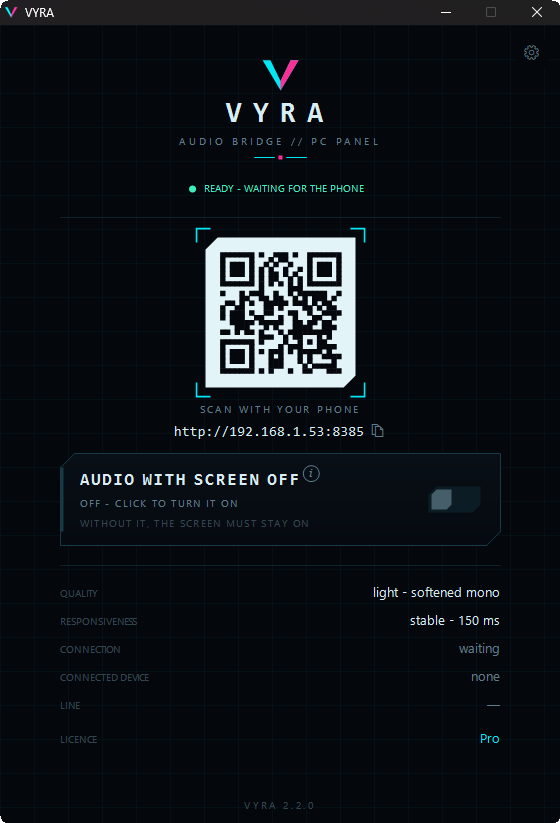
The VYRA panel on Windows: the QR code to scan, connection status and control rows
The PC panel — actual screenshot
On the phone

A page, not an app.

Nothing to install, no permissions to grant, nothing to update. It opens, you tap START, it plays. Add it to the Home screen and it behaves like an app without being one.

The big number is the delay to the phone: network plus buffer. Whatever Bluetooth headphones add after that is the same for any app and has nothing to do with VYRA.

VYRAaudio bridge
PRO
connected
24ms
to the pc
Device 1usb cable
STOP
The phone page
Beta & Pro

The Beta is not a demo.

It works forever, shows no ads, never expires and asks for no sign-up. It does exactly one thing less than Pro: it won't let you put the phone in your pocket. Everything else is comfort and quality.

FeatureBeta — freePro — 2.99 €
PC audio to your headphonesYesYes
Wi-Fi and USB cable, automatic switchoverYesYes
Phone screen must stay on, page in front turn it off, or use other apps
Audio qualitymonofull-band stereo
Responsiveness fixed 75 ms automatic — down to 22 ms over cable
Mixer: bass, mids, treble, balance, volume Yes
Phones connected at once1as many as you like
Adsnevernever
Expirynonenone
Account or sign-upnono
VYRA Beta
Free

forever — and we mean it

  • Everything you need to hear your PC in your headphones
  • Wi-Fi and USB cable
  • No ads, no expiry
  • One phone at a time, screen on
Get it
VYRA Pro
2.99 €

one payment, inside the app — not a subscription

  • Phone in your pocket: screen off, other apps
  • Full-band stereo
  • Automatic latency, the lowest your link can hold
  • Three-band mixer with balance
  • Several phones at once
Go Pro

One download for both. You install the Beta, and the Pro button is right there inside the app whenever you want it — payment handled by Microsoft. There is also a free 15-minute trial: unlock everything, hear the difference, then decide.

Control

All from the PC. Nothing to learn.

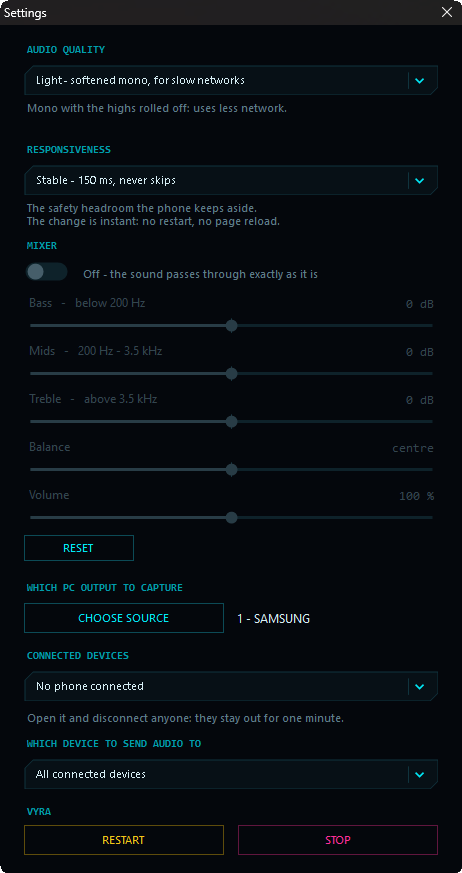
Which output to capture, which phone to send it to, how much quality, how much headroom. Plus a three-band mixer if you like to tinker.

The mixer has an on/off switch: when it's off the sound passes through exactly as it is, with no filter in the way.

VYRA settings: audio quality, responsiveness, three-band mixer, source and connected devices
Settings — actual screenshot
Guides

The things that actually come up.

Connecting over USB cable (the fastest route)

Over cable the latency drops to its lowest and stops depending on Wi-Fi. You need a data cable, not a charge-only one, and one switch on the phone:

  1. Android — Settings → Connections → Mobile Hotspot and Tethering → turn on USB tethering
  2. iPhone — Settings → Personal Hotspot → turn it on

The moment it's active the CONNECTION row in the panel turns green and the QR switches by itself to the cable address: scan it again and you're on the cable. Not sure what to do? Click that row — VYRA recognises which phone is plugged in and tells you the exact steps.

iPhone: when the cable never shows up

On Windows an iPhone only exposes its network adapter if Apple support is installed. Without it there is simply nothing to connect over the cable — it isn't a missing Hotspot.

Install Apple Devices from the Microsoft Store (free, once), then unplug and replug the cable. VYRA notices by itself and shows you the button that opens the right page.

Android needs nothing: the driver ships with Windows.

The phone can't find the PC

Nine times out of ten they're on two different networks. Check that:

  1. the phone is on your home Wi-Fi — if Hotspot is on and Wi-Fi is off, the phone cannot see the PC
  2. Windows got its Allow on the firewall prompt
  3. the router isn't isolating devices from each other (some guest networks do)

The USB cable skips the router entirely: if the network misbehaves, that's the way.

Choppy audio, or high latency

The LINE row in the panel tells you how it's really going: stable with the measured delay, a few dropouts, or unstable with how many per minute.

If it's unstable: switch to the cable, or set Responsiveness to Stable in the settings — more headroom, no jumps. On Pro the automatic mode handles it: it goes down while things run clean and climbs back the moment it feels a tear.

Don't open the page on the PC itself

The audio would come out of the speakers, VYRA would capture it again and two laps later it's a howl. VYRA notices and refuses the connection: the page is meant to be opened from the phone.

A voice note, a video, a call

iPhone and Android hand audio to one app at a time: when another one takes it, VYRA steps aside. The moment it's over VYRA comes back on its own, without you returning to the page, and resumes live — not from where it stopped.

A squeeze on the AirPods stem pauses it too: squeeze again and it resumes.

Download

Try it now.

One free download from the Microsoft Store. No dependencies, no drivers to install, and it updates itself. Pro is a button inside the app — press it and Microsoft handles the rest.

Windows 10 · Windows 11 · works with iPhone and Android

Pro upgrade 2.99 € · one payment, tied to your Microsoft account, on every PC you sign in to